Artificial Intelligence is rapidly transforming online education. Today, educators, coaches, corporate trainers, and EdTech businesses are increasingly using AI tools for generating course content to speed up workflows, reduce production time, and scale learning experiences faster than ever before.
But there’s one major concern:Does faster course creation automatically mean better learning outcomes?
Not always.
While Artificial Intelligence can significantly improve efficiency, poor implementation often leads to generic lessons, weak learner engagement, and robotic educational experiences. That’s why the conversation around instructional design and AI has become so important in 2026.
The real opportunity is not replacing human expertise; it’s combining AI efficiency with strong instructional design principles.
Why Course Creators Are Using AI Tools in 2026
The rise of AI course design tools is now part of standard eLearning workflows.
Modern course creators are using Artificial Intelligence to:
- Generate lesson outlines
- Create quiz questions
- Produce microlearning scripts
- Develop LMS-ready content
- Scale multilingual training materials
- Speed up video production
Research supports the growing role of AI in educational design. A 2025 study on generative AI in instructional design found that AI-assisted microlessons often scored higher in quality when properly guided by instructional frameworks.
This explains why many educators are exploring AI-assisted course creation, AI-generated learning content, and automated workflows for L&D teams.
For fast-growing EdTech businesses in cities like Austin, Miami, San Diego, New York City, Houston, and Los Angeles, AI-powered course production is becoming a competitive advantage.
The Biggest Problem With AI Generated Course Content
AI can create content quickly; but quality is where things become complicated.
Many creators discover that AI-generated materials often:
- Sound repetitive
- Lack emotional engagement
- Ignore adult learning principles
- Follow weak instructional flow
- Focus too heavily on information instead of learner outcomes
A major challenge in AI course design is that AI tools predict patterns; they do not automatically understand pedagogy, learner psychology, or engagement strategy.
This is why simply generating lessons with AI is not enough.
Strong instructional design and AI integration still requires:
- Clear learning objectives
- Curriculum mapping
- Assessment alignment
- Human review
- Scenario-based engagement
Best Artificial Intelligence Tools for Generating Course Content
AI Tools for Course Outlines
- ChatGPT: Excellent for course structures, learning objectives, quiz drafts, and scenario ideas.
- Claude: Great for long-form educational writing, curriculum organization, and research summarization.
- Gemini: Helpful for research-based lesson planning and multimedia suggestions.
AI Tools for Video-Based Learning
- Synthesia: Popular for AI avatar videos and multilingual training.
- HeyGen: Widely used for talking-head videos, personalized content, and corporate onboarding.
AI Tools for Interactive eLearning
- Articulate AI: Supports rapid content drafting inside Articulate workflows.
- iSpring AI: Helps streamline quiz creation and presentations.
- Canva Magic Design: Excellent for visual assets, infographics, and training presentations.
How to Maintain Quality While Using Artificial Intelligence for Course Design
1. Start With Learning Objectives FirstBefore using AI, clearly define what learners should achieve, desired outcomes, and assessment criteria.
2. Use AI for Drafting, Not Final DecisionsUse AI to brainstorm, draft, summarize, and reformat but keep final decisions and pedagogical choices with humans.
3. Apply Instructional Design PrinciplesLeverage proven frameworks like:
- Bloom’s Taxonomy
- ADDIE
- Backward Design
- Microlearning principles
- Scenario-based learning
4. Humanize AI-Generated Content
- Add conversational examples
- Include storytelling
- Use relatable scenarios
- Rewrite robotic language
- Add emotional context
5. Test Courses With Real LearnersRun pilot tests, gather feedback, review LMS engagement, and analyze completion rates.
Where AI Still Cannot Replace Human Instructional Designers
- Learning Psychology & Motivation
- Emotional Storytelling
- Context-rich Scenario Design
- Transformational Curriculum Strategy
- Ethical, Inclusive & Culturally Nuanced Design
The future is AI-enhanced instructional design, not AI replacement.
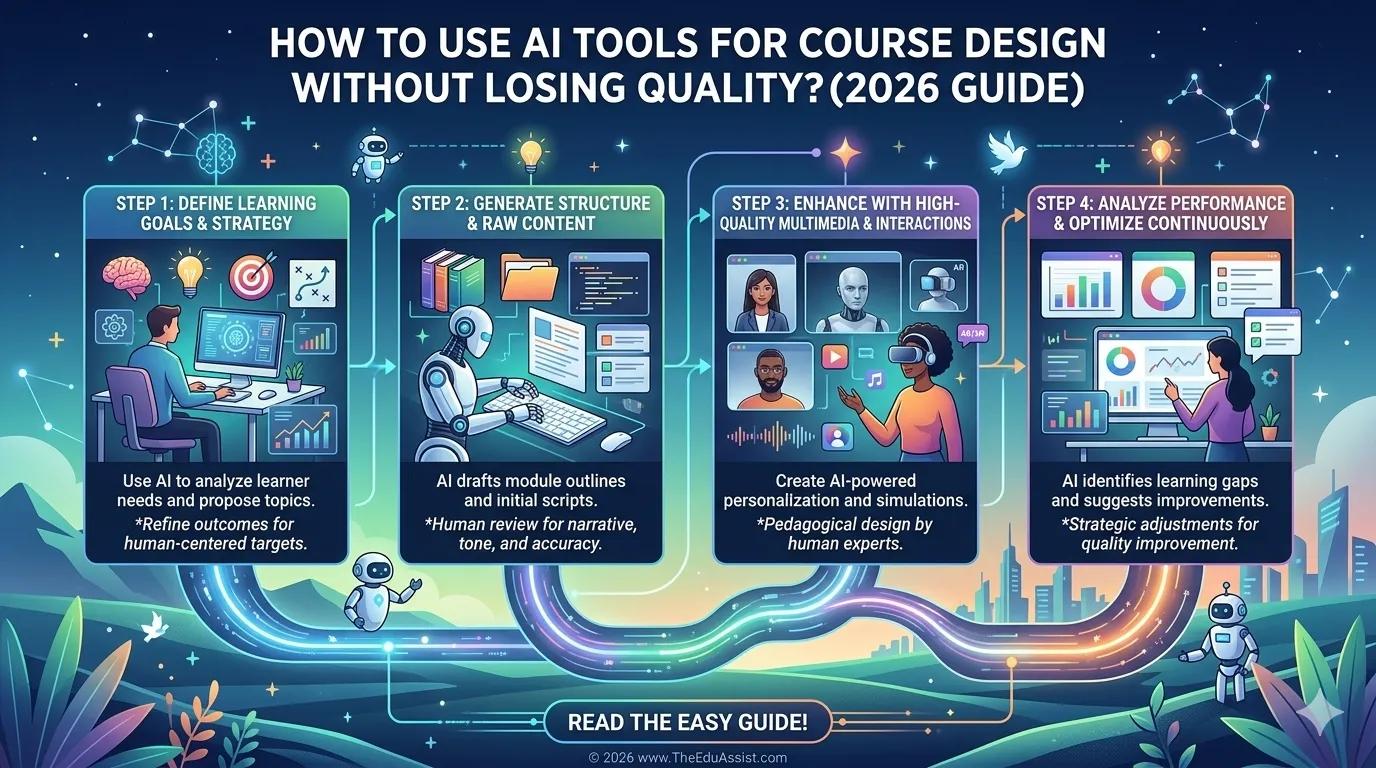
A Smart Workflow for AI-Assisted Course Creation
- Define Learning Outcomes: Start with learner goals.
- Generate Draft Content With AI: Create lesson drafts, quizzes, and outlines.
- Apply Instructional Design Structure: Improve flow, engagement, and assessment.
- Create Multimedia Assets: Use Synthesia, Canva, HeyGen, etc.
- Review for Accuracy & Engagement: Fact-check and refine tone.
- Pilot Test the Course: Gather real learner feedback before full launch.
Final Thoughts
AI is reshaping education at an incredible pace. The best learning experiences come from combining AI efficiency, human creativity, and instructional design expertise.
The future of AI-assisted course creation is about helping educators build smarter, faster, and more engaging learning experiences.
References:
- https://arxiv.org/pdf/2306.01006
- https://arxiv.org/pdf/2308.12276
- https://www.sciencedirect.com/science/article/abs/pii/S036013151400178X?via%3Dihub
- https://www.sciencedirect.com/science/article/pii/S2590291125010563
- https://journals.sagepub.com/doi/abs/10.1177/15344843251320256
- https://www.mdpi.com/2227-7102/13/9/954
- https://www.researchgate.net/publication/394712384_Generative_AI_in_Instructional_Design_Education_Effects_on_Novice_Microlesson_Quality
- https://link.springer.com/article/10.1007/s44217-024-00386-2?
FAQs
Can AI create complete online courses?Yes, AI can generate outlines, scripts, quizzes, and multimedia drafts, but human review is still essential for quality.
What are the best AI tools for generating course content?Popular tools include ChatGPT, Claude, Gemini, Synthesia, HeyGen, Articulate AI, and Canva Magic Design.
Can instructional designers use AI effectively?Absolutely. AI works best when paired with instructional design expertise and learning strategy.
How do you maintain quality in AI-generated eLearning?Use learning objectives, human editing, learner testing, and instructional design frameworks.
Is AI replacing instructional designers in 2026?No. AI is enhancing workflows, but human expertise remains critical for engagement, pedagogy, and learner psychology.
Call to ActionNeed help creating high-quality AI-assisted eLearning content?TheEduAssist helps educators, coaches, and EdTech brands combine instructional design expertise with modern AI workflows to create engaging, scalable learning experiences.
Authored By: Sofia Arif